


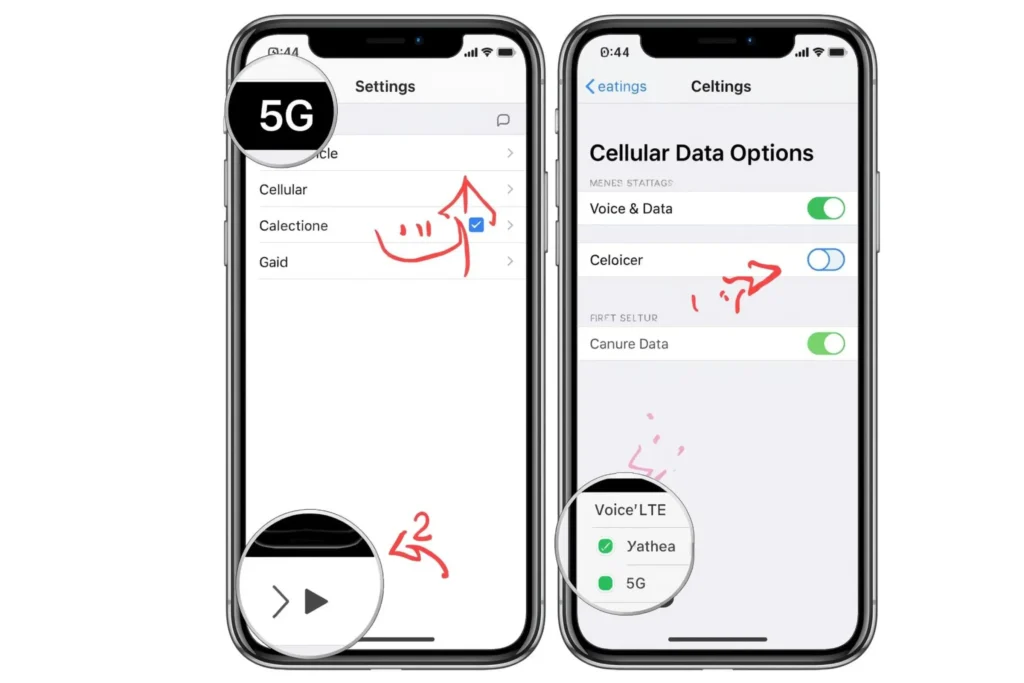
5G is rapid, yet it is known to eat your iPhone battery. A significant number of users would rather turn it off to conserve power or improve their connection. This tutorial provides a simple guide on how to turn off 5G on phone models such as the iPhone 12, 13, 14, 15, and 16.
Why You Might Want to Turn Off 5G on iPhone?
Although 5G is high-speed, it is not as often as it is required in daily activities. Applications such as social media, messaging, or even streaming do not need a significant amount of bandwidth.
The reason you should switch off 5G on your iPhone may make sense:
- Battery Life: 5G uses more power than LTE.
- Coverage: 5G is not ubiquitous (available everywhere).
- Stability: 4G LTE may be a more stable connection at times.
- Heat Problems: Your phone can get hotter on 5G.
Thus, when you realize that your battery is getting exhausted too fast or that you have no signal, it is time to switch 5G on iPhone off and use LTE.
How to Turn Off 5G on iPhone (All Models)?
You can easily manage your mobile network settings on Apple devices. The procedure is comparable to that of the majority of models, including the iPhone 12, iPhone 13, iPhone 14, iPhone 15, and iPhone 16.
Follow these steps:
- Open the Settings app.
- Tap Cellular (or Mobile Data).
- Choose Cellular Data Options.
- Tap Voice & Data.
- Select LTE or 4G instead of 5G On or 5G Auto.
When you switch to LTE, your iPhone will no longer connect to 5G networks, which can help conserve battery life and reduce overheating.
Turn Off 5G on iPhone 12, 13, 14, 15, and 16 (Model-Wise)
We can examine the process of working with each model in particular.
Turn off 5G on iPhone 12
The iPhone 12 became the first 5G-enabled device made by Apple.
- To turn off 5G on iPhone 12:
- Click on Settings> Cellular> Cellular Data> Voice and Data> LTE.
Turn off 5G on iPhone 13
Similarly, you can turn off 5G on your iPhone 13.
- Go to Settings, Cellular Voice and Data LTE.
Turn off 5G on iPhone 14
On the iPhone 14, it is also possible to have a 5G Auto option, which automatically switches networks. But to fully turn off 5G:
- Select LTE to remain at 4 G.
Turn off 5G on iPhone 15
The iPhone 15 features enhanced network management while maintaining the existing 5G settings.
- Go to Settings, Cellular, and then Voice and Data LTE to switch it off.
Turn off 5G on iPhone 16
In the case of the iPhone 16, Apple remains somewhat the same:
- Go to Cellular, then Cellular Data Options, and select Voice and Data, and finally, select LTE.
Regardless of what model you adopt, these few steps will help you control your data preferences.
Benefits of Turning Off 5G on iPhone
You may say, I will cripple something quicker. Nevertheless, in some instances, it is more comfortable to drive at a slower pace. The following are the main reasons to switch off 5G in the iPhone:
- Better battery life: LTE consumes up to 20% less battery than 5G.
- Lower Temperature: Your phone becomes cooler when you are talking or playing a game.
- Better Stability: LTE has a higher signal capacity in low 5G ranges.
- Efficiency: 4G can use less background data.
- Enhanced Roaming: In some countries, 5G may not be compatible with LTE, but it will still provide smooth connectivity.
When you spend a lot of time on the road or with your phone, even with 5G turned off, you can see some improvements.
When Should You Keep 5G On?
Although 5G should be turned off at times, it is reasonable to leave it on in certain situations.
Keep 5G On when:
- You are transferring huge files at an alarming rate.
- You are in a good 5G locality with good coverage.
- You are using those apps that need a fast internet connection (live streaming or even video conferencing).
- You would like the highest possible speeds.
However, when you notice that your phone is discharging too quickly or overheating, it is self-evident that you should switch off 5G on your iPhone in the meantime.
Conclusion
Being aware of when and how to switch off 5G on your iPhone can help your phone run more efficiently. iPhone 12, 13, 14, 15, or 16, regardless of the phone’s age, switching to LTE will increase battery life, lower heat, and improve performance, making your phone reliable all day long.
FAQs
Yes, slightly. However, LTE speeds are sufficient for common everyday activities such as browsing, social networking, or making calls.
5G consumes higher power levels to sustain a connection, meaning that a transition to LTE could contribute to increasing battery duration by many hours.
Yes! You will be able to re-enable it at Settings> Cellular> Voice and Data> 5G Auto at any time.
Read Also: